Last month I posted about the Experience Edge Webhook Admin, and the response was better than I expected. Two people gave it a thumbs up. NICE! Also more specific than I expected. People used it, then told me exactly where it annoyed them.
So here’s the follow-up release. Twelve new commits’ worth of things that were missing, broken, or quietly dangerous. If you haven’t read the first post, start there — I’m not re-explaining the basics. This one’s about what changed.
The test dialog, properly this time
I mentioned last time that you could test a webhook with sample data. That was true but generous. What existed then was a (fairly pretty) button. What exists now is a real diagnostic tool, and it’s become the thing I actually open the widget for.
Click the flask icon on any row. The dialog builds a representative request and shows its work: method and URI exactly as configured, every custom header listed and actually sent, and a request body you can edit before firing. The body it hands you depends on the webhook — OnEnd gets your configured body, OnUpdate gets a sample WebHookRequest with your Body-include merged in so you’re testing something shaped like reality, and GET sends nothing at all.
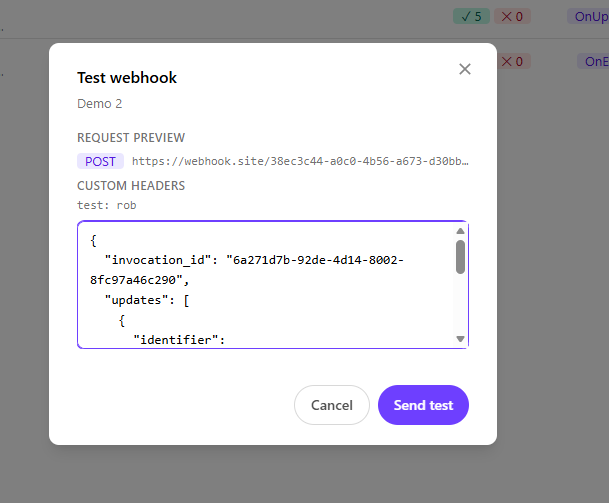
Hit Send test and you get an answer with a round-trip duration attached. Green badge and the response body if it worked. Red badge if it didn’t — and here’s the part I care about, it shows you the parsed error message. The widget digs error.message or message out of a JSON error body and surfaces that, instead of dumping the raw payload on you and wishing you luck.
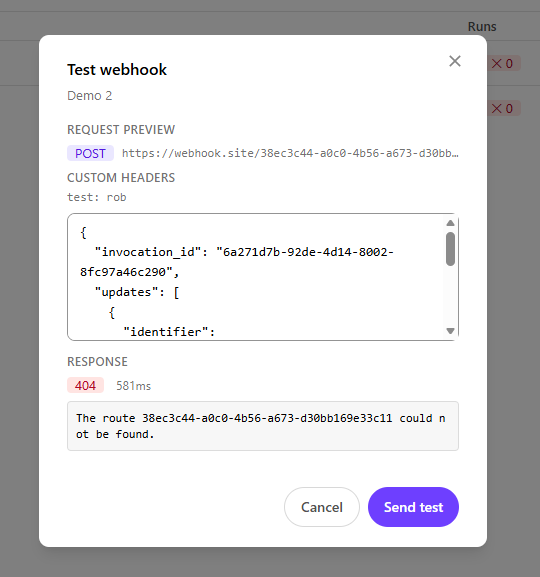
Being able to see “invalid authorization header” in four seconds instead of inferring it from a 403 twenty minutes later is most of the value of this entire project, if I’m honest.

The unglamorous part
That test request goes through a server-side Next.js route (/api/test-webhook) to get around browser CORS. Which means I built a thing that accepts a URL from a user and makes a request to it. That is the textbook shape of an SSRF vulnerability, and I’d rather not be the guy who shipped one.
So it’s fenced: valid session token required, https:// only, private and internal network addresses refused, no redirects followed, ten-second timeout, oversized response bodies truncated. Nobody will ever notice any of that, which is the entire goal.
Duplicate, without the footguns
There’s a copy icon on every row now. It pre-fills a new webhook from an existing one — URI, method, execution mode, body, body-include, every custom header.
What it deliberately does not do is clone instantly. It opens as a draft you have to confirm, because a one-click clone of a production webhook is a great way to have two things hammering the same endpoint before you’ve noticed. So:
- The name gets a
(copy)suffix, forcing you to look at it - Created by becomes you, not the original author
- Status matches the source, so duplicating a disabled webhook doesn’t quietly stand up a live one
There’s also a fix in here I’m mildly embarrassed about. The list endpoint doesn’t return Body or Body include. So a naive duplicate would have copied everything except the actual payload and looked completely fine while doing it. The form now re-fetches the full webhook before opening. Took me longer to spot than I’d like to admit.
Export and import, for moving between environments
This is the biggest addition. You can now pull webhook definitions out of one tenant as JSON and recreate them in another. Dev to prod promotion, or a backup before you do something you might regret.
Export gives you a checkbox per webhook, or Select All. Each one is re-fetched individually (same reason as above — the list endpoint holds out on you) with a Fetching n of N… progress readout. If one fails, it says so and exports the rest.
The file downloads and displays the JSON for copying, because downloads get blocked inside a sandboxed Marketplace iframe and one escape hatch isn’t enough.
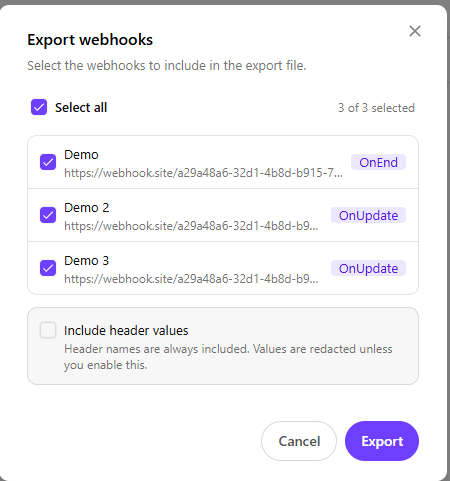
Header values are redacted by default. Names survive — knowing an endpoint expects x-api-key is useful context. Values come out as ***REDACTED*** unless you explicitly tick “Include header values,” which warns you first. Custom headers are where API keys live. A JSON file full of them is a file that ends up in a Teams chat, and then in an incident review.

The format is versioned (sitecore-webhook-admin/export, version 1) and drops server-assigned fields — id, tenantId, created, lastRuns. It also drops createdBy, which is the exporting user’s Sitecore username. No reason for someone’s identity to hitch a ride in a file that gets passed around.
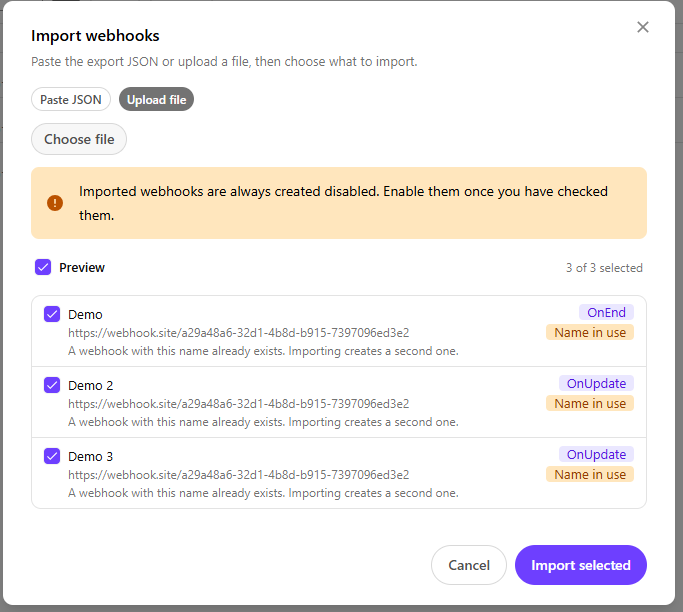
Import takes a paste or a .json upload, validates immediately, and previews every entry before creating anything:
| Badge | Meaning |
|---|---|
| Execution mode | Valid, ready |
| Cannot import | Rejected with the reason — bad URI, missing name, invalid bodyInclude, OnUpdate paired with GET |
| Name in use | Already exists. Flagged, not blocked — untick to skip, or import anyway |
| Headers redacted | Values were stripped at export; re-enter them after |
And two guarantees I’d want if someone handed me an export file:
- Imported webhooks are always created disabled. Whatever the file claims. A bulk import can never start firing at unvetted endpoints. Review, then enable.
- A redaction placeholder is never sent as a live header. Redacted entries get dropped and the row gets flagged — so you don’t end up with a webhook failing at the endpoint because it’s been faithfully transmitting the literal string
***REDACTED***as an API key.

It stopped throwing your work away
Previously: mid-edit, click Cancel or switch tabs, and your changes evaporated. No warning.
Now the form tracks whether it’s genuinely dirty, and anything that navigates away from unsaved changes asks first. Cancel, tab switch, opening another row, jumping to Settings.
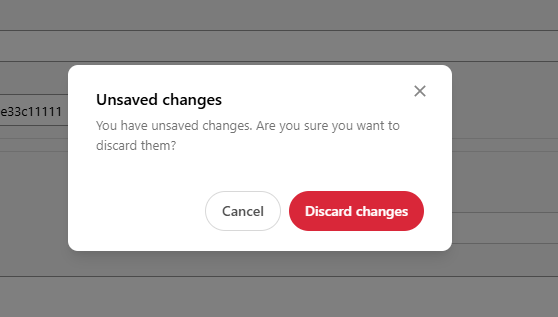
The tracking is fussier than you’d expect, on purpose. Editing a header value marks the form dirty. Clicking a header’s edit icon does not. Intermediate UI fiddling shouldn’t trigger the warning, because the fastest way to train someone to reflexively click through a confirmation dialog is to show it when it doesn’t matter.
The empty states earn their space
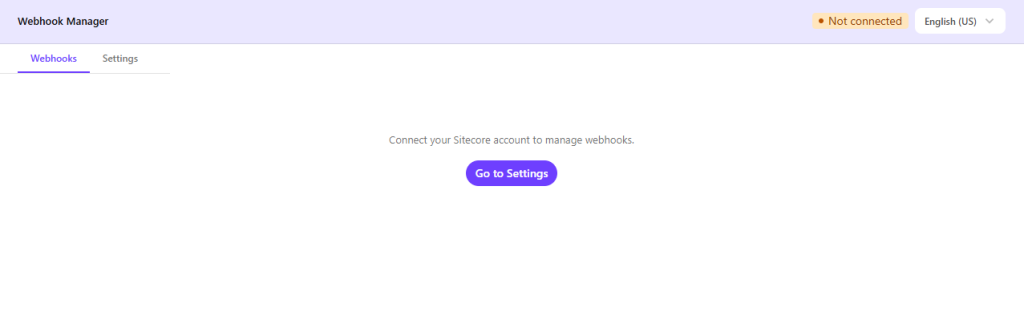
The old behavior before you connected was an empty list. Accurate. Useless.
Now it adapts. Not connected gets you a prompt with a Go to Settings button, and the Execution log and Create tabs stay hidden entirely because there’s nothing to do without a session. Connected with no webhooks gets a + New webhook call to action. A search that matched nothing gets a Clear filters shortcut, while the stat cards keep showing real totals so you don’t think everything vanished.
Also: you can now just press Enter from either credential field instead of reaching for the Connect button.
Expired sessions stopped being cryptic
The JWT is short-lived by design. What used to happen when it lapsed was a raw 401 or 403 surfacing as an API error with no obvious next move.
api.ts now throws a typed SessionExpiredError, and the UI catches it everywhere — listing, editing, enabling, disabling, deleting, loading a webhook to test — and shows a clear, localized “session expired, reconnect in Settings” message. Open Settings, hit Connect, resume.
Sorting, and stat cards that do something
The list sorts by name now. Locale-aware (follows your interface language), case-insensitive, and numeric — so Rebuild 2 lands before Rebuild 10 rather than after it. That last part doesn’t happen by accident; you have to actually go looking for it.
The Total / Active / Disabled cards are clickable filters now. Click one, the list filters, the card highlights. The numbers on them still always reflect unfiltered totals.
Form fields that follow the mode
Small thing, big reduction in confusion. The body field now tracks your mode and method, so you only ever see the one that applies:
OnEnd+POST→ Body textareaOnUpdate→ Body include textarea, and the method is forced toPOSTbecauseOnUpdatecan’t useGETOnEnd+GET→ no body field at all, and none is sent
GET only appears as an option in OnEnd mode, since that’s the only place it’s legal.
The plumbing
Things that don’t show up in the UI but matter if you’re deploying this:
- Security headers in
next.config.ts— CSP, HSTS, the usual. Image optimizer off. - Both API routes are origin-checked and rate limited, via a shared
request-guard.ts. - Endpoints are hardcoded constants in
src/lib/constants.ts, deliberately not client-configurable, so no crafted request can point a server route at an arbitrary host. - Icons now come from Material Design Icons (
@mdi/js) — the same set Sitecore Blok uses, so the widget stops looking like a stranger in the Sitecore UI. Anicons.tsfile maps meaning (edit,duplicate,disable) to glyphs, so swapping an icon is one line in one place. No hand-written SVG. - i18n got split into one file per language under
src/lib/i18n/, all typed against a sharedTranslationsinterface. Which means TypeScript now names every language you forgot to update when you add a string. Maintaining twelve translations is only survivable because the compiler nags you. - Two optional env vars, neither secret:
APP_FRAME_ANCESTORS(who may embed the widget) andAPP_ALLOWED_ORIGINS(extra origins allowed to call the API routes). - New scripts:
npm run start,npm run lint,npm run audit:ci(fails on any high or critical dependency vuln), andnpm run sbom(writes a CycloneDX SBOM). - Language choice now persists across sessions in
localStorage(sc_wh_lang) instead of resetting every time. It also drives execution-log date formatting and the list sort order. - Node 20.9+ is now required. Next.js 16 insists. If you’re on 18 from the last post, that’s your upgrade.
One API quirk worth writing down
This cost me an afternoon, so let me save you one: the Edge Admin API ignores disabled on create. You can politely request a disabled webhook and it will cheerfully hand you back an active one.
createWebhook compensates with a follow-up update when a disabled webhook was asked for. Both the import and duplicate flows lean on this, which is why “imports are always created disabled” is an actual mechanism and not just a UI promise.

The honest bit
There are no automated tests in this project. None. It’s manual verification all the way down. Give me a 25th hour in a day, people.
I’m not going to dress that up. It’s on the list, it’s the obvious weak point, and I’d rather you hear it from me than discover it while reading the source and wondering what I was being cagey about. Standing invitation for a PR.
Go break it
Live demo, no signup, no commitment: sitecore-edge-webhook-admin.vercel.app
Source: github.com/RAhnemann/sitecore-edge-webhook-admin
You can also install it as a Marketplace App, same as before. If you’re using the export or import buttons and they seem inert, check that you installed the app with the download and clipboard features enabled.
Most of this release exists because someone told me what was annoying about the last one. That worked out well, so: keep doing that.
Happy webhooking, folks.
TL-DR:
- Import/Export Webhooks
- Duplicate Webhook
- Security Fixes
- Fixed ugly icons
- Bug fixes and code simplication