Quick and dirty one here, for myself and anyone who ran into this weird message….
I was minding my own business one day, and suddenly, the Sitecore God’s frowned upon me.

Ok, so I was actually working (don’t act shocked) and Converting a Legacy Project into a Decoupled Project. I clicked the Options -> Convert just like the docs say and things quickly sprung into action. The little dial spun and all my options were grayed out. I couldn’t delete a project, restart it, etc. I guess things were working. So I took a break.
I came back to my command prompt to fire up the CLI and provision a new rendering host for my CM which was likely already converted over.
I ran dotnet sitecore cloud editinghost deploy -id <SUPER_SECRET_ID> –upload to deploy an editing host and was greeted with an error I’ve literally never seen before: “Error: Environment is Locked”

I won’t lie, I was pretty confused. What would “lock” an entire environment? I again went into SitecoreAI Deploy and tried to restart the environment, but that was still disabled. I tried to delete it,but disabled. Pretty much any action was disabled. I couldn’t delete the project, as it still had environments.
Maybe there was something in the log file. Oh…there was. An entire log filled with:
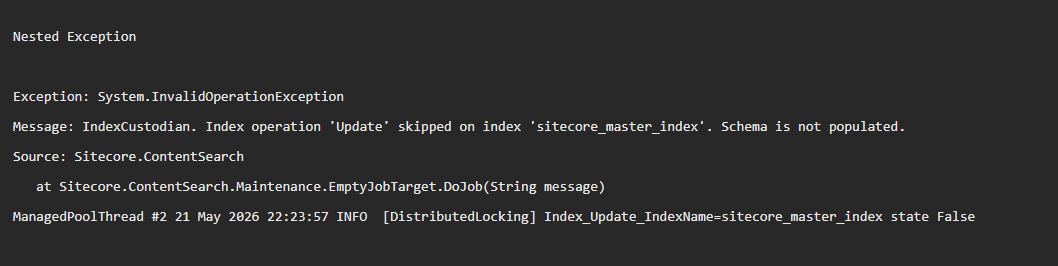
Not gonna lie, I’ve not seen this error in…forever. Not since the early docker days. CM was having an issue starting up and my new hypothesis was that this was somehow blocking the environment. After a quick hop (like five clicks…) into the Control panel, I managed to get the schema populated. After a bout five minutes or so…my issues were solved. I could now do my CLI thing.
My running theory is the process works like this:
- Convert Environment Start
- LOCK
- Deprovision CM
- Reprovision CM
- Deploy to CM and restart
- <Wait for Health Check to pass>
- UNLOCK
And that Health Check was likely gating the entire unlock process. In any case, that’s all I have for you today. If you do have any questions or comments about this, please leave them below. This has been the LockingPickingLawyer…have a great day.