Let me paint you a picture. It’s a Tuesday. Everything’s fine. Then a content author pings you: “Hey, my changes published an hour ago but the site still shows the old version.” And you go huh, that’s weird, and you start digging, and forty-five minutes later you discover that one of your Experience Edge webhooks quietly died nine days ago and nobody knew because there’s no dashboard, no alert, no nothing. Just a disabled: true sitting in a JSON response that nobody was looking at.
That’s the moment this tool was born. Out of spite, mostly. Healthy, productive spite.

The thing nobody tells you about Edge webhooks
Experience Edge webhooks are great. They fire when publishing happens, you can hang all kinds of automation off them — CDN purges, Vercel rebuilds, downstream sync jobs. There are two flavors: OnEnd (fires after a publishing job finishes, with a static JSON body you define) and OnUpdate (fires when specific content entities are updated, with a JSON body-include filter that narrows which updates actually trigger the call).
Here’s the part that’ll get you, though. A webhook that keeps failing eventually gets disabled — and there’s no email, no banner, no beep. The webhook just goes dark, and the only way you’d know is if you happened to be querying the lastRuns property by hand. Which you weren’t. Nobody was.
It’s like a smoke detector that, instead of beeping, simply removes itself from the ceiling and goes to live in a drawer. Technically it stopped a problem. Practically, you’re going to find out the hard way.

So I gave it a face
The Experience Edge Webhook Admin is a Sitecore Marketplace dashboard widget — Next.js 16, TypeScript, wired into the Marketplace SDK — that does one job and does it without making you open a terminal: it gives you a real, clickable UI for every webhook in your tenant. (If you’re wondering why Marketplace SDK for this, it’s because some fancy Credential Manager would allow this to seamlessly tie into your Edge Credentials in the future.)
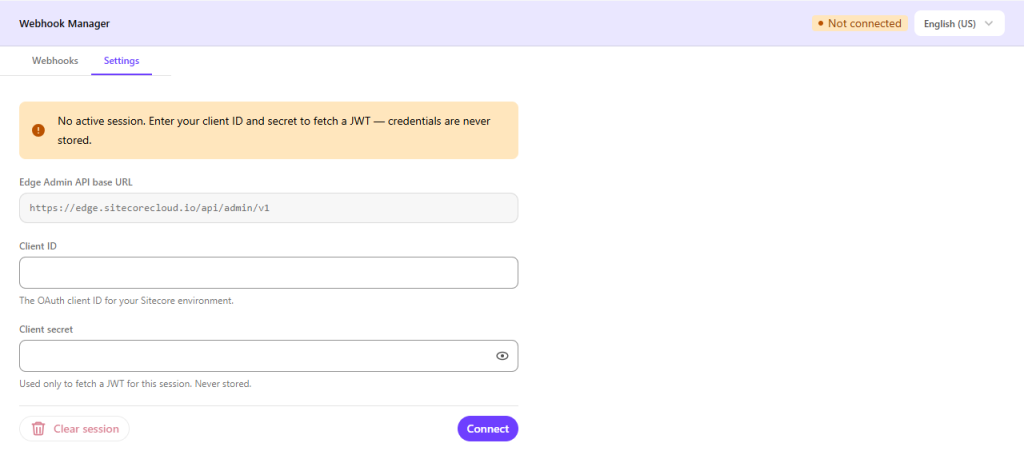
You open the Settings tab (or click the session pill in the top-right), drop in your OAuth Client ID and Client Secret, and hit Connect. The base URL is pre-filled and read-only, and the secret field is hidden behind an eye-icon toggle so you’re not flashing credentials to whoever’s standing behind you during a screen-share. Small touch, but I like it.
What you actually get
Here’s the rundown of features, minus the marketing gloss:
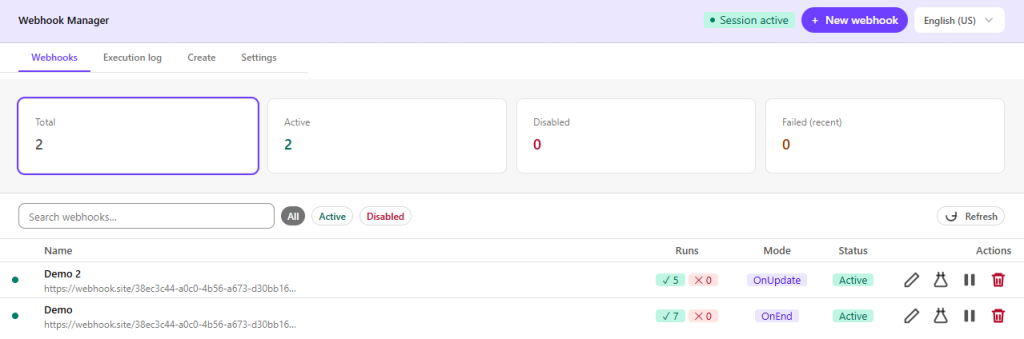
- A webhook list that tells you something at a glance. Every row has a status dot. Green means active and healthy. Amber means active but a recent run failed — go look. Red means disabled. No more reading raw JSON like tea leaves.
- Summary cards up top that always show your full unfiltered counts, even when a search or filter is active. So filtering for “vercel” doesn’t make your overall health picture disappear.
- Inline run history. Click the ✓ / ✕ count badges on any row and it expands right there — timestamps, results, error messages. No new page, no navigation.
- A real create form with validation. Name, URI (https only — it’ll reject http, and honestly good), method, execution mode, body, body-include filter, and as many custom
key: valueheaders as you want. The “Created by” field auto-populates from your Sitecore user via the Marketplace SDK. No more hand-writing JSON and forgetting a comma. - Inline editing with one webhook expanded at a time, so your screen doesn’t turn into chaos. Open a second row and the first one collapses.
- Confirmation dialogs on the scary stuff — disabling, enabling, and deleting all ask “you sure?” first. Delete specifically warns that it can’t be undone.
- The Execution Log tab — my favorite. One unified, newest-first view of recent runs across every webhook, up to 50 entries (that’s the ceiling the API’s
lastRunsgives us). When something breaks at 3pm, you scroll to 3pm and there it is. No more querying each webhook one at a time and assembling a timeline like a detective with a corkboard and red string. There’s a Refresh button to re-pull fresh data. - A Test Function — Test your own webhooks with some sample data. No longer do you have to publish that same piece of content (after adding a random period) over and over to see if your webhook works.
- Twelve languages. The whole UI is translated — English (US + UK), Spanish, French, Portuguese, Chinese, Japanese, Hindi, Bengali, Arabic, Russian — with a switcher in the header that persists for your session. That’s eleven more languages than I personally speak. I even added Klingon for those who are nerdier than I am.

The part I’m quietly proud of (and the part I’ll be honest about)
When you connect, the widget doesn’t just YOLO your credentials around the browser. The OAuth token exchange happens server-side through a little Next.js API route (/api/token). Your Client ID and Secret get forwarded to Sitecore’s auth endpoint server-side, the JWT comes back, and the credentials themselves are held only in React component state and explicitly cleared from memory the instant the token arrives. They’re never written to storage. Not localStorage, not cookies, nothing.
The token that does stick around lives in sessionStorage under a couple of prefixed keys (sc_wh_url, sc_wh_token) and gets wiped automatically when you close the tab — or immediately, if you hit the Clear session button. The reason the token fetch is a server-side proxy at all is to dodge CORS, but the nice side effect is that your secrets spend about as little time exposed as physically possible. It’s the difference between handing someone your house key versus letting them in the door yourself and locking it behind them.
Now, the honest bit, because I’d rather you hear it from me than find out later: while a session is active, that JWT in sessionStorage is reachable by any JavaScript running on the same origin. That’s just how sessionStorage works — it’s not a flaw unique to this tool, but it’s worth saying out loud. So don’t go running untrusted third-party scripts alongside it. The README says this too, plainly, and I respect a tool that tells you where the sharp edges are instead of pretending it doesn’t have any.
Want to run it?
You can directly run it from: https://edge-webhook-admin.vercel.app/. No strings attached. We’re not committed or anything, just enjoy the freedom.
You can also add it as a Marketplace App for your projects. Nothing too complicated there, either.
Want to run it locally?
It’s refreshingly low-ceremony. No .env file to wrangle — the API base URL and OAuth endpoint are hardcoded public, non-secret constants. Clone it, then:
npm install        # install dependencies
npm run dev        # dev server at http://localhost:3000
npm run build      # production build
You’ll need Node 18+, a SitecoreAI environment with Edge Admin API access, and a set of credentials that has permission to manage webhooks. That’s the whole shopping list.
Adding a thirteenth language, if you’re so inclined, is a four-step job in src/lib/i18n.ts — add the code to the Lang union and LANGUAGES array, drop in a translation block, and the switcher picks it up automatically. The architecture is tidy too: a LanguageContext provider for i18n, a useMarketplaceClient hook that handles SDK init and resolves your user, and types in src/types/webhook.ts that mirror the Edge Admin API objects exactly — no translation layer, no guessing.
The bottom line
You can manage Edge webhooks with raw API calls. People have run production on worse. But “you can” and “you should” are different phrases. The whole point of this thing is to turn “I found out my webhook was dead from an angry client” into “I saw the amber dot and fixed it before anyone noticed.” That trade is worth a dashboard.
Go kick the tires: github.com/RAhnemann/sitecore-edge-webhook-admin
And if your webhooks start behaving strangely after you install it — well, now you’ve got a log for that. Funny how that works.
Happy webhooking, folks.
Transparency Alert: I did, absolutely use AI to help generate the app. In fact, I taught the same AI how to write like me. And it did it sober. Does that make this less useful? Of course not. Do you hate AI and all that it entails? Maybe but that’s not my problem…




Great article and must read