Most folks don’t know about ETags. I mean, I didn’t. Which means most people didn’t. I don’t have an ego…and you’re wrong.

Ok, so ETags are basically a way to uniquely identify a piece of content. This matters when it comes to efficient loading of content in Next.js. When you request a piece of content, that request contains an ETag header. Next.js looks at that, determines if it matches what’s sitting on the file system, and then either returns a 304 if they match, or a 200 and the FULL content. This applies to all static resources, even things like the prefetched JSON. I guess you can think of it like a hash identifier.
Aside from user experience, this ability to only “stream content when it’s changed” can have a measurable impact on say…your hosting consumption. If every request (including prefetch…so much prefetch) was not cached somehow…yikes. Needless to say, I was investigating some bandwidth consumption issues on a project and this very topic came up. In the below screenshot, you can see multiple requests to the same resource over and over and over again, all yielding a 200 status code and the full payload being returned each time.
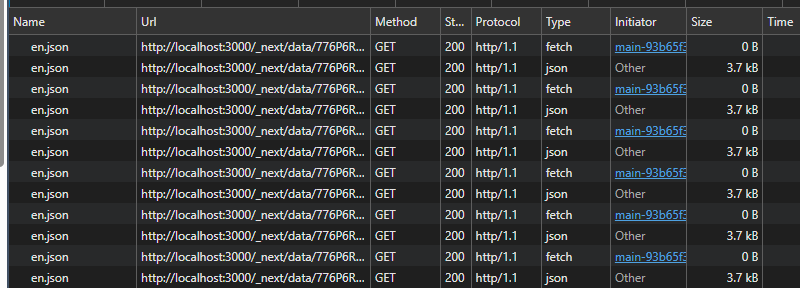
This is…not ideal. I connected with the Vercel technical team and we spent a couple hours trying to diagnose the issue. Nothing. It should have been working as we didn’t disable the generation of ETags (which can be done with the next.config.js…but I don’t recommend you do it). We had to drop, but the team was going to pursue it offline. The next day, I got a pretty interesting email. This was, in fact, a bug with Next.js. The team had released a new version (v15.5.14) to address the issue. If you’re on Next.js v16, you will have to wait for v16.2.1 to drop, as it’s currently in canary.
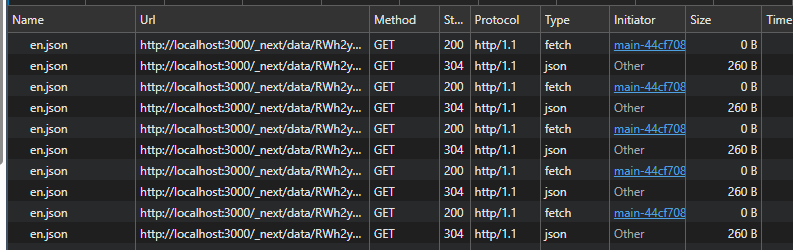
After updating to next 15.5.14 and redeploying, you can see our ETags came through again. Our request size on the home item’s JSON went from 3.7kB to 260 bytes. A reduction of 93%. This is pretty awesome!